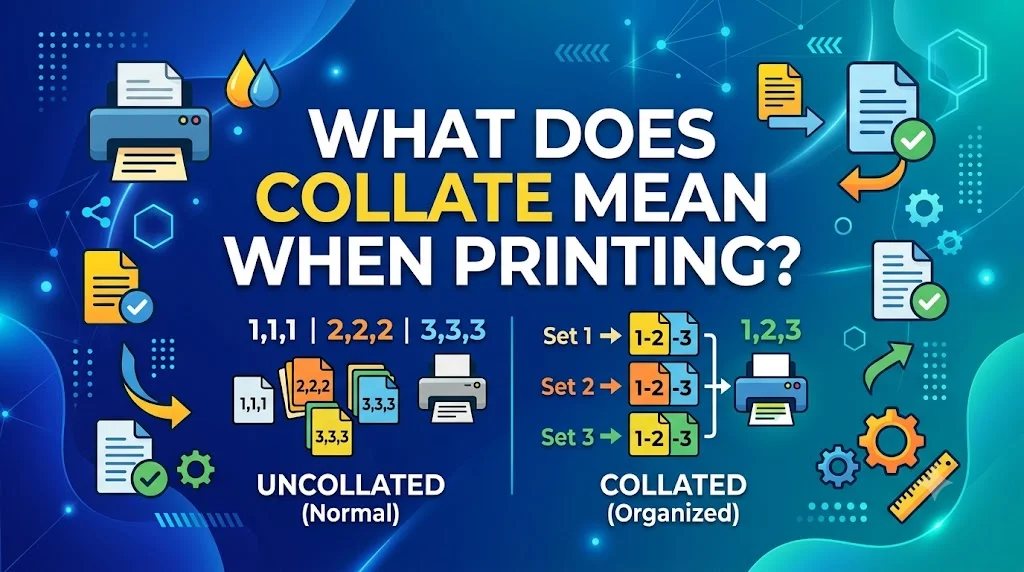
Printing a document should be simple, yet one small setting can completely change the way your pages come out. Many people overlook the collate option until they end up sorting stacks of paper by hand. Understanding what does collate mean when printing can save valuable time, reduce mistakes, and make every print job far more organized, whether you’re printing homework, business reports, manuals, or presentations.
The collate feature is designed to arrange multiple copies in the correct page order automatically. It may seem like a small detail, but it becomes incredibly useful whenever you need more than one complete copy of the same document.
Once you understand what does collate mean when printing, choosing the right print settings becomes effortless. A simple adjustment can improve efficiency, eliminate unnecessary page sorting, and help every printing task finish faster and more smoothly.
What Does Collate Mean When Printing? Meaning & Definition
Collate when printing refers to the process of arranging multiple copies of multi-page documents in their correct, sequential order. When you select the collate option on a printer, it organizes the pages so that each complete set of copies is grouped together properly.
The term is commonly used in:
Office printing environments
School and university settings
Print shops and copy centers
Home printing tasks
Professional document preparation
Booklet and report printing
Manual and instruction booklet creation
Because the term has specific technical meaning in printing, some users may not immediately understand its function or importance.
Definition
| Term | Meaning |
|---|---|
| Collate | A printing function that arranges multiple copies of multi-page documents in correct sequential order. Each complete set is grouped together properly. |
Pronunciation: Kuh-LATE (rhymes with “late”)
Origin
The origin of “collate” traces back to the Latin word “collatus,” which means “brought together” or “gathered.” The term has been used in various contexts for centuries before being applied to printing and document organization.
Several key points about its origin:
The term entered the English language through ecclesiastical and academic settings where documents were carefully organized. It became associated with bookbinding and manuscript preparation where pages needed to be arranged in proper sequence.
As printing technology evolved, the term was adopted to describe the automated process of organizing printed pages. Modern printers now include collate functionality that automatically arranges pages in correct order.
The term gained widespread usage in office environments during the 20th century as photocopiers and printers became common workplace tools. Today, collate remains an essential printing function understood by professionals and casual users alike.
Popularity
Collate became a standard printing term because it solves a common problem in document preparation. Without collation, printing multiple copies of multi-page documents would require manual sorting and organizing.
Several factors contributed to its widespread adoption:
Office automation and efficiency
Professional document standards
Educational printing requirements
Business report preparation
Booklet and manual production
Time-saving capabilities
User-friendly printer interfaces
Universal understanding among professionals
The term’s continued relevance demonstrates how fundamental document organization remains in both professional and personal settings.
Where You May See Collate
| Platform | Common Usage |
|---|---|
| Office Printers | Document preparation, reports |
| School Settings | Worksheets, handouts, exams |
| Print Shops | Booklets, brochures, manuals |
| Home Printers | Personal documents, projects |
| Professional Settings | Business reports, presentations |
| Libraries | Research materials, copies |
| Copy Centers | Bulk printing jobs |
How It Is Used
Collate is generally used to describe the organization of printed pages in proper sequence.
The intended use depends heavily on the printing context.
Professional Context 💼
Used for business documents and reports.
Example:
“Please collate these reports before the meeting.”
Educational Context 📚
Used for classroom materials and handouts.
Example:
“Make sure to collate the exam papers for each student.”
Personal Context 🏠
Used for home printing projects.
Example:
“I need to collate these invitations so each set is complete.”
Technical Context
Used in printer settings and menus.
Example:
“Select the collate option for multiple copies.”
Examples
Professional Examples
These examples show how collate is used in workplace settings.
“Please collate the annual report with all sections in order.”
“The printer automatically collates when you select that option.”
“We need to collate these documents before the client meeting.”
“Could you show me how to collate on this printer?”
“The collate feature saves us so much time with large print jobs.”
Important: Understanding how to use collate properly can save significant time and prevent document organization errors.
Printing Settings Examples
These examples show how collate appears in printer menus.
“Select collate for 10 copies of this 20-page document.”
“The collate option is checked by default on this printer.”
“If you don’t collate, you’ll get all page 1s together.”
“Collating is essential for booklet printing.”
“The software allows you to collate or uncollate your print job.”
Practical Examples
These examples illustrate real-world applications.
“When printing 5 copies of a 10-page report, collate gives you 5 complete reports.”
“Without collate, you’d get 10 copies of page 1, then 10 copies of page 2.”
“Collate is especially important for manuals and instruction booklets.”
“Teachers always collate exams to give each student a complete test.”
“Print shops always collate when preparing marketing materials.”
Comparison with Similar Terms
Many printing terms describe document organization. Here’s how collate compares.
| Term | Meaning | Typical Use |
|---|---|---|
| Collate | Arrange pages in correct sequential order | Multi-copy printing |
| Uncollated | Pages grouped by page number | Single-copy printing |
| Duplex | Print on both sides | Double-sided printing |
| Sort | Organize in specific order | General organization |
| Assemble | Put together in proper sequence | Manual organization |
| Compile | Gather from multiple sources | Document creation |
| Collate | Arrange copies properly | Professional printing |
Among these terms, collate is specifically focused on arranging multiple copies in sequential order.
Alternate Meanings
Unlike some printing terms that have several definitions, collate has specific meaning in printing contexts.
Outside of printing, collate can refer to gathering or organizing information from various sources. In academic contexts, it may mean comparing different texts or documents.
When you encounter collate in any context, the surrounding conversation usually makes the meaning clear. The term’s specificity makes it relatively unambiguous in printing discussions.
Professional or Practical Tips
If you want to use collate effectively in your printing tasks, here are practical guidelines.
| Situation | Recommendation |
|---|---|
| Multiple copies | Always select collate for efficiency |
| Single copies | Collate doesn’t matter |
| Booklets | Collate is essential for organization |
| Reports | Collate saves time and prevents errors |
| Exams | Always collate for complete sets |
| Manuals | Collate for proper instruction sequence |
These tips communicate how to use collate effectively in various printing scenarios.
Common Mistakes
Many people misunderstand or misuse collate. Here are the most common mistakes.
Assuming Collate Is Automatic
Some people believe all printers automatically collate. This is not always true. Always check your printer settings.
Confusing Collate with Duplex
Collate organizes pages. Duplex prints on both sides. They are different functions entirely.
Not Understanding the Purpose
Some users don’t understand why collate matters. Without collation, organizing multiple copies becomes time-consuming and error-prone.
Forgetting to Select Collate
When printing multiple copies of multi-page documents, forgetting to select collate results in pages grouped by page number rather than complete sets.
Using Collate Improperly
For single-copy printing, collate doesn’t make a difference. Using it in these situations doesn’t affect output.
Quick Tips
Keep these practical guidelines in mind when using collate.
- Understand what collate means before printing.
- Always check printer settings for collate options.
- Select collate for multiple copies of multi-page documents.
- Remember that collate organizes complete sets.
- Avoid confusing collate with duplex printing.
- Learn your printer’s specific settings for collation.
- When in doubt, test a small print job first.
- Consider the final document use before selecting collate.
FAQ
What does collate mean when printing multiple copies?
When printing multiple copies, collate arranges the pages so that each complete copy is grouped together. For example, printing 5 copies of a 10-page report with collate gives you 5 complete reports.
What is the difference between collate and uncollated?
Collated printing gives you complete sets grouped together. Uncollated printing groups all copies of page 1 together, then all copies of page 2, and so on.
When should I use collate when printing?
Use collate when printing multiple copies of multi-page documents that need to be complete sets, such as reports, booklets, manuals, or exams.
What does collate mean on a printer setting?
On a printer setting, collate means the printer will arrange pages in correct sequential order for each copy. This ensures each copy is a complete document.
Why is collate important for printing?
Collate is important because it saves time and prevents errors in document organization. Without collation, you would need to manually arrange pages into complete sets.
Does collate matter for single page printing?
No, collate only matters when printing multiple copies of multi-page documents. For single-page or single-copy printing, collate doesn’t affect the output.
How do I select collate on my printer?
Most printers have a collate option in the print settings menu. Look for a checkbox or toggle labeled “collate” in your printer software.
Conclusion
So, what does collate mean when printing? In most printing contexts, it refers to arranging multiple copies of multi-page documents in correct sequential order. This essential printing function ensures that each complete set of copies is grouped together properly. While it has become standard across office printers, print shops, and home devices, understanding how and when to use collate remains important for efficient document preparation.
Understanding terms like collate can help you navigate printing tasks more effectively and produce professional-looking documents. The feature saves significant time and prevents organization errors that would require manual correction. Whether you’re preparing business reports, educational materials, or personal projects, knowing the meaning and application of collate helps you work more efficiently.
When using collate, always consider your specific printing needs. It works perfectly for multi-copy multi-page documents but isn’t necessary for single-page or single-copy printing. By understanding appropriate usage, you can confidently use this essential printing feature when your task requires it.
Discover More Post:
What Does Sigma Mean| Complete Meaning, Origin, Usage …
What Does Tralalero Tralala Mean| Complete Meaning, Origin …